Showing posts with label Android. Show all posts

Friday, 23 August 2013

There was a time I read about a Samsung device having a feature called "Split Screen" A feature that allows user do some things, say :Browsing and watching movie at the same time: Then, I was like, damn, Thats cool, yeah! So now, even tho I use a SGT2. I still havnt seen that feature. But now, I think, almost EVERY ANDROID DEVICE can have that feature. Yes! But how?
...
There are these two apps from the same Developer - GPC
Gplayer & Floating Browser.

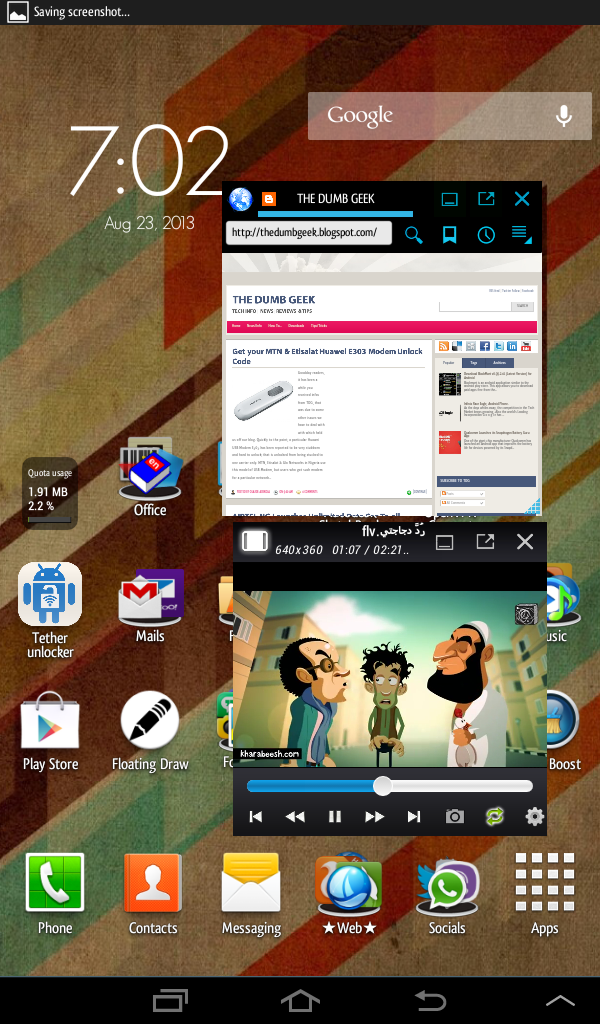
These two apps can perform their funtion while floating on the screen of your device. You can resize them, move them to a particular place, do some other stuffs while they just do their work.

So visit the Playstore and get the following apps.
Gplayer - https://play.google.com/store/apps/details?id=gpc.myweb.hinet.net.PopupVideo&hl=en

Floating app - https://play.google.com/store/apps/details?id=gpc.myweb.hinet.net.PopupWeb&hl=nl

With these two apps, you can watch movies while still surfing the web.

See a screenshot of these apps in action.


The windows can also be resized to anysize to quickly perform another task..

Thanks for checking TDG, Should you have any questions? Use the comment box or reach us using the Contact form on our Blog.
Posted by Unknown On 4:23 pm No comments [CONTINUE]

Wednesday, 12 June 2013


Airtel Nigeria has taken a big step in leading in the Telecommunication battle as it just gave its customers the best for their money.

The Reg-Flagged Company has offered unlimited data cap for just N1,500./Month. Now thats incredible. The plan can be used on all mobile devices and PC. You no longer need to worry over fair usage policy or you have exceeded your data plan when you still have weeks before the expiration period. This time, Surf, Ping, Chat, Download Unlimitedly.

Activating Airtel Unlimited Package?
-Recharge N1,500 Airtime on Your Airtel sim for monthly and for weekly, recharge #525After That, -Dial *440*16# for Monthly, weekly  dial *440*17#, and day *440*18#
A Confirmation Message would be sent to you
Rock and rock until you are tied of using the net.
Device Compatibility
Airtel unlimited is compactible with all internet enabled device
Nokia, Android, Galaxy Tab, Iphones, Blackberry and PC.

To check you data balance just dial *141*712*0#

NB : This is a legal service from Airtel 
Posted by Unknown On 12:42 am No comments [CONTINUE]

Sunday, 9 June 2013

Never lose your android device...

Today, we would be reviewing a process on how to find back our Stolen/Lost Android device.
And this would be achieved by having the CERBERUS app on our device.

Cerberus is a complete anti-theft application,which can help you recover your misplaced, lost or stolen Android device.

Steps:
1. Download Cerberus Anti Theft from the PlayStore

2. Open the app and sign up with your mail account

3. Do play around in the settings (Sorry, i dont have my device to give screenshots)

But the point where Cerberus works is this;
You can control your device from anywhere online at www.cerberusapp.com

If you find out your phone is missing or misplaced.. Go to www.cerberusapp.com and log in with you details which you used in the cerberus app.

From there you can remotely do the following ;
- Locate and track it using the Google Map
- Start a loud alarm, even if the device is set to silent mode
- Wipe the internal memory and the SD card
- Hide Cerberus from the app drawer
- Lock the device with a code
- Record audio from the microphone
- Take pictures/screenshot using either cameras on your device
- Get a list of last calls sent and received
- Get information about network and operator the device is connected to
- And much more!

Also, Cerberus can also give you an alert if another SIM is used on your phone.. (Alerts would be sent to a number you would have entered in you set-up)

Go try out Cerberus...

Should you need help on a particular app or you need an app to do a particular task but dont know where or what to search for, kindly use the "Contact us" form on our page. And we might help you.

You can watch the video below to see hoe this app works. Thanks to Dailyappshow for the video
Posted by Unknown On 4:48 pm No comments [CONTINUE]

Wednesday, 29 May 2013


"Congratulations on your new Android device" That was how a friend greeted me when i also got my first android phone. So i'm saying same to you if you fall in the New Android User category.

The device is a smartphone, so you the holder gotta be smart too (lol.) Nevermind!
Would like to let you know the device you're having is a very high level of potential in serving.

What do you expect from the Big G.???

Would like to share with you some essential settings and apps you should be having on your device to get you smart on the go.

You would like to the device you have is a power and data hungry beast! Yes, the simple formular is 

Android + Power + Data = Genuis
Android - Power - Date = Toy

Even HTC would state in their manual that you need an unlimited data plan to enjoy their device.

So, you got the phone, data is ready, power is on standby. Lets kick off

Log in your Play store and ready to pimp your smartphone.

Would like to suggest some neccessary setups. (Just an opinion) as you need to save battery life.


1. Brightness : Looking at the "battery use" in android devices, "Screen" seems to have the longest usage bar. Yes, Display, so to save more battery, lets set up some display settings to ease the lynching of the battery life. Leaving the screen backlight at the lowest would be perfect but if your the type that use the phone anywhere (like in the daylight outside) you can set to auto so the sensor can switch between levels in indoor and outdoor situations. Also, untick the "Auto-rotate screen"


2. Sync : Set the sync time intervals to longer time as short sync time can be draining battery real good. You can also choose to sync manually.


3. GPS ; If you're not the type that uses Map all the time, You can de-activate the gps.

4. WiFi : Leaving the wifi on can also hinder long-lasting battery-life. Activate only when needed. There are apps that can manage wifi. Apps can help you switch off the wifi when its not in use.


5. Data : Also, setting the data connection type at lower eg 2G would also do great in saving more battery juice

Ok! For settings, thats a lil you can try out to optimize your device battery life.

Later, i would be sharing tips on how to enhance the BatteryLife/Device with some applications. Stay tuned. Always check here for more tips. (Part 2)

If you enjoyed the tips, pls share with others, like, and comment.
Also, should you have any additional tip and suggestion for us, we'll be very greatful. Kindly use the form on the right hand pane to reach us.


Posted by Unknown On 9:30 am No comments [CONTINUE]
I was just cruising this cool afternoon when when i saw this video on Youtube by Snapdragon; a giant CPU manufacturer. So i decided to share with my readers.

The video was illustrated to show how Chipset works and how much power they consume which leaves effects on the battery life of our smartphones. A device (dont know which device) having the Dual-Core Snapdragon Chipset on was compared with a competitor having a Quad-Core chipset. Both were connected to a power monitor.

The smartphone batteries were bypassed. That way, both phones are fed the same voltage (3.7 volts). The boxes are also able to measure the current passing through the phones. A call was then placed to each phone so you can see how much current is being used during the phones calls. With the displays on and off, the Qualcomm Snapdragon smartphone is the least power-hungry in the modem department compare to its competitor. 

Watch the video and see the results for yourself.


Video Credits - Snapdragon Processors
Posted by Unknown On 7:43 am No comments [CONTINUE]

One of the giant chip manufacturer Qualcomm has launched an Android app that improves the battery life for devices powered by its Snapdragon chipset Processor.


The app Snapdragon BatteryGuru, is available free on the Google Play Store, works with both hardware and software to maximize power cell longevity by intelligently adjusting the device settings without disabling its often used features.


The app 'studies' users behavior and tweaks internal settings such as sync frequencies of apps accordingly, saving valuable charge from being expended needlessly as the device connects to Wi-Fi and mobile networks to update.

Since its launch, the app has seen over 100,000 downloads and is said to optimize performance offered by Android devices featuring the  integrated modem that comes as part of the Snapdragon chipset.


Qualcomm recently posted test results illustrating the low-power consuming qualities of its wares in which it was demonstrated that a device running a dual-core Snapdragon chip clocked at 1.2GHz used 42% less power than a non-Snapdragon competitor. Both handsets were fed the same voltage of 3.7v as a control during the experiment.

Snapdragon BatteryGuru was  initially released as a beta version in February of this year as part of Qualcomm's efforts to combine efficient and powerful processing with smartphone stamina.


The CPU giant says that its BatteryGuru app will work alongside its processors to extend the use smartphone owners get from their devices from a single charge, something that will no doubt be a boon to users for whom short battery life has been a bugbear since the advent of smartphones.

Below is a video on How the app works.


Credits - Knowyourmobile.com

Posted by Unknown On 7:08 am No comments [CONTINUE]

Sunday, 26 May 2013


Blackmart is an android application similar to the android play store. This app allows you to download paid apps free from there their servers. Blackmart has an excellent interface that lets you search and find apps and games easily. Even though downloads are reported not to be very fast, the downloads are stable. Blackmart has filter functions to help you sort apps by name, price, size, dates. value and gives the ability to uninstall applications also to make backups of them.


A newer version has being released recently with thousands of new features and a new UI including some extra settings along with some Updated apps and games, all for free. Based on Ice Cream Sandwich (ICS), its really fast and attractive.

All apps downloaded from the application are stored in the application folder which you can get access to using various file-manager.


Posted by Unknown On 5:17 pm 3 comments [CONTINUE]

Monday, 20 May 2013


Welcome to another exciting review.

I am a big Android fan. With my device. I have the world at a fingersnap. I’m a tech savvy so I rooted my device. I rooted so I can have full functionality of my device, since then, I never regretted it. I try out new Custom ROMS, Application, etc. At first when I started, after flashing a new rom which probably wipes out the entire device. Even though I have backups (APKs) of my applications. I would have to start installing one after the other. It used to be very annoying and boring because I have to sit and watch my phone install up-to 60 applications. Then, I was random-surfing one day and came across this software;    MOBILEGO!


Mobile go was created by Wondershare. Its available for Android and iOS.

- This Android phone manager gives you a simple, smart interface to plug in and go. It instantly recognizes and remembers more than 970 Android devices as soon as you plug in. (Unlimited devices supported in Wi-Fi mode.) It’s a big screen, bird’s eye view of your phone, your life – so you get more done.


Let’s talk about few things MobileGo would do;

Back it all up or Restore with a Click
Tired of randomly losing stuff from your phone? Maybe you just want to make extra room for more media? With MobileGo, you can 
back up everything including contacts, SMS, apps, catalogs, etc. Vice versa, you can restore all or selected backed-up files to your Android phone with a click.
 
Music, Photos and Video on the Go
Forget to move your downloaded shows, music, whatever the night before and now you’re stuck in line somewhere staring at a blank screen? Wanna enjoy media anywhere? MobileGo for Android helps you push music, photo, and video easily to and from your androi device.


Transfer Contacts between Symbian, iOS and Android
Got a shiny new mobile device and want to load it with all your old contacts, texts and call history? Maybe it’s one of those older Symbian devices, or a newer iOS or Android device? Or maybe you just want to add your friend’s contacts from their device to yours? Now it’s easier than ever to get it done: simple one click, you can transfer contact list, SMS and call logs between different devices without missing a beat.

Organize Your Apps
Got too many apps that don’t do enough and want to get rid of them in a flash? Maybe you like downloading apps with your PC and want an easier way to transfer them to your phone? MobileGo lets you keep your game status on apps and quickly install/uninstall apps on your device from your PC Moreover, you can export apps to your PC as well.


Seamlessly Send & Reply Texts
Now you can reply and send text messages on your PC without instead of doing it on a tiny four-inch screen. Just get this Android manager to free your hands and text like a champ!

Convert Video and Audio
MobileGo for Android Pro not only helps you push music, photo, and video easily to your phone. Now, the enhanced converter allows you to convert video and music files like AVI, MOV, MKV, FLV, WMV, WMA, AIFF, MKA, etc. to Android-optimized formats and fit your devices. Furthermore, you can even extract audio from a video file.


Sync iTunes Playlist to Android


With the Pro version, you can effortlessly import your iTunes music playlist to Android devices and export music to iTunes library. Just get it now and break down the wall between iTunes and Android.


Import / Export Contacts from/to Outlook/Windows Mail
 
Want to transfer your phone contacts to Outlook and Windows Mail or vice versa? With MobileGo for Android Pro, you can easily import and export contacts to/from Outlook 2003, Outlook 2007, Outlook 2010 and Windows Mail/Windows Address Book.


Download MobileGo here!

Share this with your friends... You can drop a comment if you have a question.


Posted by Unknown On 2:49 am 3 comments [CONTINUE]

Monday, 29 April 2013


Cerberus is a complete anti-theft application, the best protection you can get to recover your misplaced, lost or stolen Android device. This is a free trial for one week, then you can buy a lifetime license for a small price (2.99€) from within the application: no monthly or yearly fees, just a one-time payment. License is associated to your Cerberus account, if you have multiple devices you can use all of them (up to 5) with the same account.
It has three ways to protect your device:
- Remote control through the website www.cerberusapp.com
- Remote control via text messages
- SIM Checker (for devices that have a SIM card): you will automatically receive alerts if someone uses your phone with an unauthorized SIM card
Remote control allows you to perform many operations on your device, like:

- Locate and track it
- Start a loud alarm, even if the device is set to silent mode
- Wipe the internal memory and the SD card
- Hide Cerberus from the app drawer
- Lock the device with a code
- Record audio from the microphone
- Get a list of last calls sent and received
- Get information about network and operator the device is connected to
- And much more!

Cerberus automatically enables GPS if it is off when you try to localize your device (applies only only on Android < 2.3.3) and you can protect it from unauthorized uninstall.
This app works even if the device does not have an internet connection thanks to remote control by sms messages. Also, the SIM Checker feature allows you to know the new number to send texts to, if the SIM card is changed. Texts received and sent for Cerberus remote control will not start any notification and will not appear in the Messages application.
Cerberus does not drain the battery because there is no background service running: it will activate only if there is a remote control request and will stop afterwards.
More features for rooted devices: complete uninstall protection (a thief will be able to delete Cerberus only by flashing another ROM), GPS auto-enabling even on Android > 2.3.3. More info on the website in the Help section.

Go to Google Playstore for Download and more info.

Posted by Unknown On 7:58 am No comments [CONTINUE]

Are you an Android user? Do you download huge-sized files on the internet?
Would like to introduce you to LOADER DROID.
LoaderDroid is a download manager for android. It supports any type of file for downloading: videos, images, music, applications, anything.

Features:
* Resumeable downloads (continue loading from the same place it was interrupted)
* Auto pause when connection lost
* Auto resume when connection reappear
* Intercepts links from Browser and other applications
* You can define what connection is allowed for each link (WI-FI, 3G, etc)
* Faster loading by splitting loading into parts
* Scheduling
* Stable, fast and easy to use
It solves many problems with the standard Android Browser, which is sometimes unable to load files (including e-books, video streams, audio, applictions, zip files, etc.)
It may also help load video streams from your favorite website (for example, the website doesn't natively support downloading and only displays in video player).
Just click on link in the Android Browser and select LoaderDroid from list of applications. Or you can share a link to LoaderDroid using Android sharing feature.
Also you can click on the "plus" button in the action bar and enter the link manually (by typing or pasting). And finally you can use embedded browser into LoaderDroid, it automatically detects loadable links as soon as you click on them.

LoaderDroid can easily download huge files: it is just a question of time and space on your sdcard. LoaderDroid supports resumable downloading, so don't worry if you lose connection or pause loading - loading will be restored from the place it was interrupted. LoaderDroid loads via specified connection (WI-FI only, WI-FI and mobile) and if the connection is switched off or disconnected, all downloads will be paused immediately, so don't worry about your carrier traffic.
For most servers LoaderDroid will load in 3 threads: sometimes this increases loading speed up to 3 times.
Also it is very smart Android loader and will not use any type of resource if it is not necessary.

Loader Droid is available in Free version and an AdFree version (Pro Key) for $2.49
Download LOADER DROID from Google Playstore.

Happy downloading!!!
Posted by Unknown On 3:41 am No comments [CONTINUE]
  • RSS
  • Delicious
  • Digg
  • Facebook
  • Twitter
  • Linkedin
  • Youtube